Need Help?
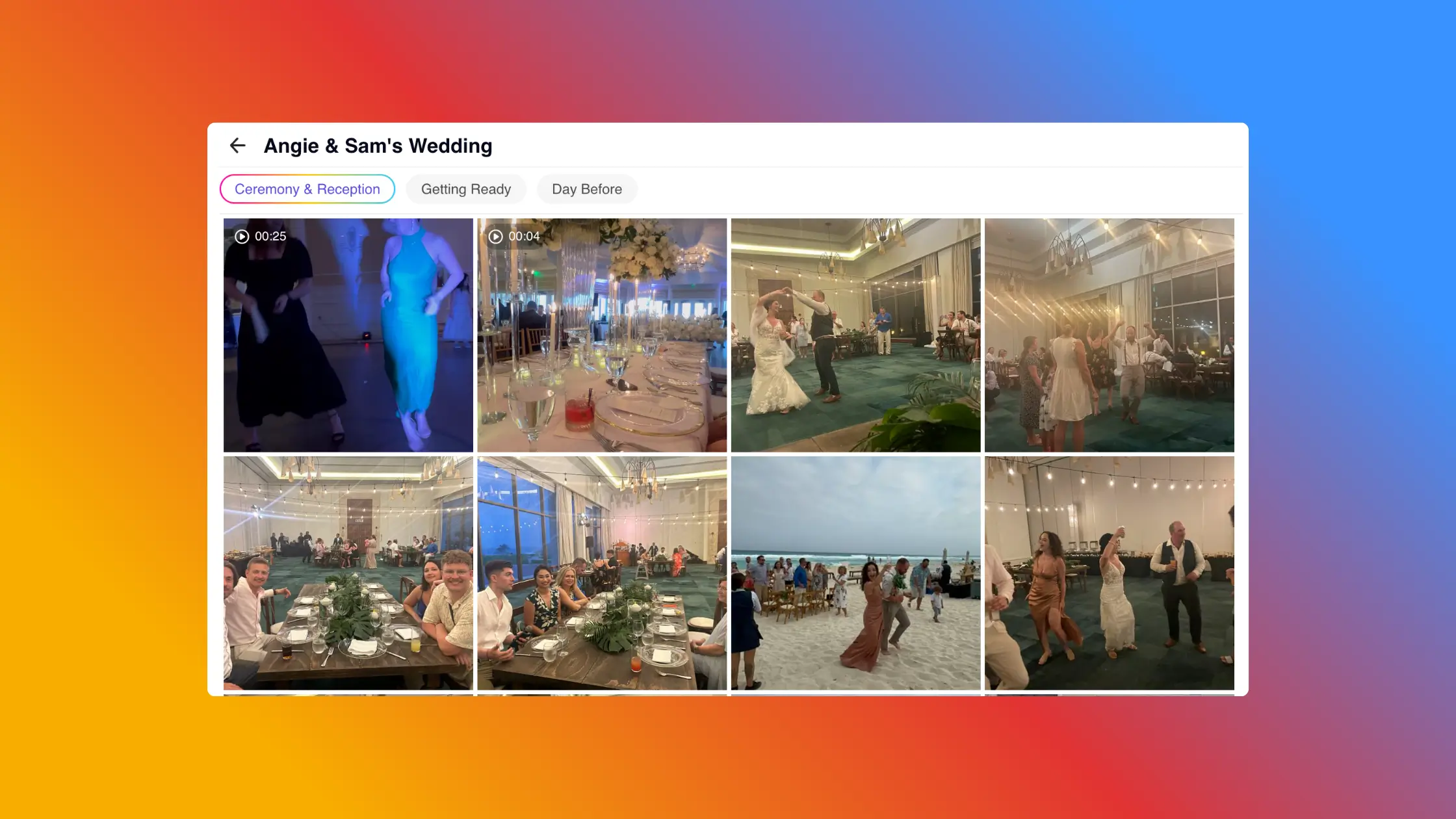
A wedding weekend can produce a lot more than one set of wedding photos.
There might be a welcome party, rehearsal dinner, getting ready, the ceremony, reception, after-party, and farewell brunch. Add photos from guests, your photographer, and maybe a photo booth, and it is easy to end up with thousands of files spread across several places.
The best system is usually not the most detailed one. It is the one that is easy for guests to use during the wedding and easy for you to understand afterward.
A good wedding photo collection should make it obvious where photos belong without turning every upload into a filing exercise.
If you are planning ahead, start with your wedding-weekend itinerary.
If the wedding has already happened, use the same idea to organize the photos you already have.
For example:
Friday
Saturday
Sunday
The exact structure will depend on your weekend. A destination wedding may have an extra dinner or group activity. A smaller wedding may only need two or three sections.
The important part is to organize around events people naturally recognize.
This is something we see often running GuestCam.
Couples sometimes start by creating lots of sub-galleries because they want everything organized from the beginning. They might create separate sections for the ceremony, cocktail hour, speeches, dinner, first dance, cake cutting, dance floor, and send-off.
It looks organized from the host side, but it can make things more tedious for guests.
Every extra category gives guests another decision to make before they upload. It also gives the host more sections to manage.
In most cases, Reception is enough. You can always sort speeches, first dances, and other specific moments later if you actually need to.
Start with fewer categories than you think you need.
There are three sensible ways to handle a multi-day wedding.
This is the option I would recommend for most weddings.
For example:
Wedding Weekend
Everything stays together, but the major events remain easy to browse.
If guests will be uploading during the weekend, this gives them a small number of obvious choices without making the experience complicated.
Some events may need to stay separate.
For example, the rehearsal dinner might have a different guest list, or you may want different access settings for different parts of the weekend.
In those cases, separate galleries can make sense.
Just avoid creating separate collections simply because you can. Every additional gallery, link, or QR code creates something else for you and your guests to keep track of.
This can be the simplest option of all.
Guests upload everything into one place, and you organize the photos after the wedding when you have more time.
GuestCam makes this approach practical because hosts can create sub-galleries later, select multiple photos or videos at once, and move them into the appropriate sections.
So if you are deciding between a highly organized guest experience and a very simple one, I would usually favor simplicity.
You can always add more organization later.
Even a good folder structure will not help much if the photos are scattered across several services.
Without a plan, you might end up with welcome-party photos in a shared album, rehearsal-dinner photos in a group text, day-of photos sitting on guests' phones, and brunch pictures somewhere else entirely.
If you are planning ahead, choose one place for guest uploads and use it throughout the weekend.
If you are organizing after the wedding, start by gathering the different sources together before worrying about detailed categories.
The goal is to reduce fragmentation first. Fine-tuning the organization can come later.
There is an important difference between organizing photos for guests and organizing them for yourself.
Guests should only need the broad structure.
You can handle the detailed sorting afterward.
Once everything is together, you can identify:
You can also create a favorites collection without changing the original structure.
GuestCam's reactions feature can help with this. When you or a guest reacts to a photo, GuestCam automatically creates a personal view containing those reacted-to photos and videos. That gives people an easy way to revisit favorites without requiring another gallery to be created manually.
Professional and guest photos often work best together, but you do not have to mix every original file immediately.
Your photographer may capture the ceremony, portraits, and formal moments. Guests often capture the things happening outside that view, such as another table laughing, the shuttle ride, people getting ready, or the late-night part of the reception.
Keeping the sources recognizable at first can make the collection easier to manage.
For example:
Wedding Weekend
You can then create a combined favorites collection later if you want one album that tells the story of the whole weekend.
For more on the difference between the two, see our guide to professional wedding photos vs. guest photos.
Once the wedding is over and the gallery is organized, download a copy of the files you want to keep.
Ideally, the downloaded folders should match the structure you already created.
For example:
Wedding Weekend
├── Welcome Party
├── Rehearsal Dinner
├── Wedding Day
└── Farewell Brunch
GuestCam preserves this structure when hosts create a ZIP Export. If the online event contains galleries or sub-galleries, the downloaded ZIP follows that same organization.
That means you do not have to recreate your folder system again after downloading everything.
The easiest mistake to make is assuming more folders means better organization.
From what we see with GuestCam events, simpler structures are usually easier for both the host and the guests.
Start with the major parts of the weekend. Give guests as few decisions as possible while they are uploading. Then add more organization afterward only if it is useful.
If your wedding has a Welcome Party, Wedding Day, and Farewell Brunch, those three sections may be all you need.
And if one gallery works perfectly well for everything, that is fine too.
If you are planning your wedding weekend now, GuestCam gives guests one simple place to share their wedding photos and videos, while still giving you galleries and sub-galleries when you actually need more organization.

Regan Black is the founder of GuestCam, an event and wedding photo sharing platform trusted by thousands of couples and leading brands to collect and preserve more than 20 million memories. He writes about event technology, wedding planning trends, and how modern couples are reimagining the guest experience.

Scan the QR code or use the link below to step into the guest portal and see how easy it is for guests to join and upload.